The Bug Report Template That Developers Actually Love
Stop wasting hours on bad bug reports. Use our proven bug report template to learn best practices, see real examples, and ship better software, faster.
The Bug Report Template That Developers Actually Love
A bad bug report isn't just an annoyance; it's a productivity killer. We've all seen them—those vague, incomplete tickets that kick off a frustrating game of email tag, turning a quick fix into a multi-day saga. The best defense against this chaos? A rock-solid bug report template. It's the simplest, most effective tool to stop this cycle dead in its tracks.
How Bad Bug Reports Sabotage Your Workflow
Picture this: a developer gets a ticket titled "Image uploader broken." The description? "Users can't upload their profile picture. Please fix." That's it. No steps to reproduce the issue, no browser info, no error messages. The developer is completely blocked.
Is this happening on all browsers or just Safari? For all image types or only JPEGs? Are there any errors in the console? Every one of these questions is another Slack message, another email, another delay. This isn't just inefficient—it's a morale crusher that brings your team's momentum to a screeching halt.

The Hidden Costs of Vague Reports
The time spent decoding a poorly written report adds up fast. What seems like a five-minute question can easily balloon into hours of lost engineering time, directly tanking your team's velocity and pushing back release dates.
This problem is so widespread it’s driving major industry growth. The global market for bug tracking software—tools built around structured reporting—jumped from $218.22 million in 2018 and is projected to hit $601.64 million by 2026. This isn't a surprise. Teams are realizing that moving away from messy email chains and into structured templates can slash triage time by up to 50%. If you're interested, you can dig into the full market analysis.
"A bug report is a conversation starter. If it lacks clarity, the conversation is doomed from the beginning, leading to frustration and delays."
Without a standardized template, your team is fighting a losing battle against several recurring problems:
- Unreproducible Bugs: The classic dead end. If a developer can't make the bug happen, they can't fix it.
- Wasted Triage Time: Product managers and team leads end up playing detective, hunting for basic details instead of prioritizing the backlog.
- Delayed Fixes: Critical issues fester for days, not because they're complex, but because the initial report was too thin to act on.
- Developer Frustration: Being forced to constantly ask for the same basic information is a major source of friction and a fast track to burnout.
Moving From Chaos to Clarity
Adopting a good bug report template is about more than just adding fields to a form. It's about establishing a common language for your entire team, from engineering to customer support. It ensures every issue is documented with enough precision for a swift resolution.
When you have a clear framework, even non-technical team members can submit actionable reports. They know exactly what information to provide.
This structure gives developers the context they need from the get-go. Tools like Monito take this even further by automating the grunt work. Instead of someone manually typing out browser versions or copy-pasting console logs, Monito captures all those technical details automatically. It turns a tedious chore into a one-click action, making sure every report is rich with the data needed to solve the problem.
The Perfect Bug Report Template You Can Copy and Paste
Enough with the theory—let's get right to it. Here’s a comprehensive, developer-approved bug report template formatted in Markdown. You can grab this and drop it directly into whatever issue tracker your team uses, whether it's Jira, GitHub, Linear, or something else. Think of this less as a checklist and more as a powerful communication tool built for clarity and speed.

The Ultimate Markdown Bug Report Template
Use the block below as the foundation for every bug ticket you create. It’s designed to ensure all the critical information is there from the get-go, which drastically cuts down on the frustrating back-and-forth questions.
Title
A concise, descriptive summary of the bug. (e.g., "[Checkout] 'Pay Now' button is disabled after entering valid credit card details")
Environment Details
- Device: (e.g., MacBook Pro M2, iPhone 14 Pro)
- Operating System: (e.g., macOS Sonoma 14.1, iOS 17.2)
- Browser: (e.g., Chrome 120.0.6099.129, Safari 17.1)
- App Version: (e.g., v2.5.1 Build 1034)
- Connection Type: (e.g., WiFi, 5G Cellular)
- Account Used: (e.g., tester01@example.com)
Steps to Reproduce
Provide a clear, numbered list of actions needed to trigger the bug, starting from a neutral state.
- Navigate to the pricing page.
- Click the 'Pro Plan' subscription button.
- Fill out the checkout form with valid user and credit card information.
- Observe the 'Pay Now' button.
Expected Result
What should have happened after the final step?
- The 'Pay Now' button should become active and clickable.
Actual Result
What actually happened? Be specific.
- The 'Pay Now' button remains grayed out and disabled, preventing the user from completing the purchase.
Visual Proof
Attach relevant screenshots, screen recordings, or log files.
- [Link to screen recording showing the entire process]
- [Link to screenshot of the disabled button]
- [Link to console logs captured during the session]
Severity
Categorize the impact on the user and the system.
- High/Critical: Blocks a core user flow or causes data loss.
- Medium: Negatively impacts the user experience but has a workaround.
- Low/Minor: A cosmetic or UI issue that does not affect functionality.
Breaking Down Each Field in the Template
Just having a template isn't the whole story. Understanding the why behind each field is what really empowers your team to write reports that get issues fixed fast. Let's dig into what makes each of these components so crucial.
Title
The title is the first thing a developer sees. It needs to be a powerful, at-a-glance summary that instantly communicates the problem's location and nature. A great title makes triage a breeze and helps everyone spot duplicate issues before they waste time.
- Bad Example: "Button not working"
- Good Example: "[Settings] Save Changes button unresponsive on Profile page"
See the difference? The good example gives us context ([Settings], Profile page) and tells us exactly what’s happening (Save Changes button unresponsive).
Environment Details
Bugs can be chameleons, behaving one way on Chrome for Windows and completely differently on Safari for macOS. Providing these details isn't optional; it's often the single most important clue for reproducing the issue.
A developer trying to fix a bug without environment details is like a mechanic trying to fix a car without knowing its make or model. It's an exercise in pure guesswork.
This is your first line of defense against the dreaded "works on my machine" response. Be specific with version numbers—they matter more than you think.
Steps to Reproduce
This is it. The big one. If an engineer can't reliably reproduce the bug, they can't confidently fix it. Simple as that. Your steps need to be a crystal-clear, unambiguous recipe for recreating the problem every single time.
- Bad Example: "Went to checkout and it broke."
- Good Example:
- Add 'Product A' to the cart.
- Proceed to the checkout page (
/checkout). - Enter 'DISCOUNT10' in the promo code field and click 'Apply.'
- See the page crash.
That level of detail leaves nothing to chance and saves the developer from having to play detective.
Expected vs. Actual Result
This simple pairing is what defines the problem. The Expected Result is what you know the software should do. The Actual Result is the broken behavior you observed.
Putting them side-by-side immediately highlights the discrepancy the engineer needs to fix. It frames the bug perfectly: here's the gap between what should be and what is.
Visual Proof
A picture is worth a thousand words, and a video is worth a thousand pictures. Visual evidence removes all room for interpretation and gets everyone on the same page, fast.
- Screenshots: Perfect for static UI bugs like a misaligned button or incorrect text.
- Screen Recordings: Absolutely essential for showing bugs that involve a sequence of actions, weird animations, or anything where timing is key.
- Logs: Console and network logs are a goldmine for uncovering the hidden errors that don't appear on the screen.
This is where tools like Monito are a game-changer. They automatically capture the entire context—screen recordings, console logs, network requests, and more—all in one place. It takes the burden off the person reporting the bug and gives developers a rich, complete picture to work with.
Severity
Not all bugs are created equal. A typo on the "About Us" page is a nuisance; a bug blocking users from logging in is a catastrophe. Assigning a severity level helps product managers and team leads prioritize work effectively. It ensures the team is always focused on fixing what matters most to the business and its users.
Bug Report Template Field Breakdown
To tie it all together, here’s a quick summary of each field and why it's a non-negotiable part of a great bug report.
| Field Name | Purpose | Why It Matters |
|---|---|---|
| Title | A concise summary of the issue. | Provides immediate context for triage and helps in searching for duplicates. |
| Environment | Lists the specific device, OS, browser, and app version. | Narrows down the cause and helps developers replicate the exact conditions. |
| Steps to Reproduce | A clear, numbered list of actions to trigger the bug. | This is the single most critical element for allowing a developer to fix the bug. |
| Expected Result | Describes the correct, intended behavior. | Defines what "fixed" looks like and sets a clear goal for the developer. |
| Actual Result | Describes the erroneous behavior that occurred. | Clearly states the problem by contrasting it with the expected result. |
| Visual Proof | Links to screenshots, recordings, or logs. | Eliminates ambiguity and provides undeniable evidence of the bug. |
| Severity | Categorizes the bug's impact on users and the business. | Helps the team prioritize the most critical fixes and manage the backlog effectively. |
Getting everyone on your team to understand the "why" behind these fields is the secret to moving from frustrating bug reports to fast, effective fixes.
Seeing the Bug Report Template in Action with Real Examples
Theory is one thing, but seeing a template work in the wild is where its value really clicks. Let's take a common, frustrating scenario: a vague bug report that lands in a developer's queue and brings progress to a screeching halt. Then, we'll see how a solid template transforms that same report into something clear, actionable, and easy to fix.
What a Bad Bug Report Looks Like
Picture a developer starting their day and finding this ticket. It's the kind of report that creates more work than it solves, wasting time for everyone.
Title: Website is broken
Description: The login button on the checkout page doesn't work. When I click it, nothing happens. This is a big problem because our customers can't check out. Please fix this ASAP.
This report is a dead end. Right away, a developer is hit with a wall of questions. Which checkout page? The one for new users or returning ones? What browser? Is "nothing happens" literally true, or was there a console error? And "ASAP," while well-intentioned, just adds stress without providing any useful context.
Why It Fails So Miserably
This ticket fails because it forces the developer to stop coding and start investigating. They have to track down the person who filed it just to get the basics, kicking off a chain of Slack messages or emails that could drag on for hours, if not days.
Here’s a quick breakdown of the problems:
- Vague Title: "Website is broken" is useless for sorting and prioritizing issues.
- No Environment Details: We have no idea about the device, OS, or browser.
- Unclear Steps: "Click it" isn't a reproducible instruction.
- No Visuals: There's no screenshot or recording to show what the user actually saw.
This kind of communication gap is exactly what a well-designed bug report template is meant to close.
When teams adopt structured templates, the impact on efficiency is huge. Industry data shows that clear, detailed bug reports can slash Mean Time To Resolution (MTTR) by 30-50%.
For support and QA, that means faster triage and fewer tickets getting bounced back. For developers, it means less time chasing down information. Modern tools like Monito take this even further by capturing user sessions and logs automatically, creating perfect, Jira-ready tickets that eliminate the guesswork. You can learn more about how structured reporting elevates software quality on Katalon's blog.
Transforming the Bad Report into a Great One
Now, let's see that same issue rewritten using our template. Look at how this version provides instant clarity and gives the developer everything they need to get straight to work.
Title: [Checkout] Login button unresponsive on guest checkout page for existing users
Environment Details:
- Device: Dell XPS 15
- Operating System: Windows 11
- Browser: Chrome 121.0.6167.161
- Account Used:
customer-test@example.com(existing user account)
Steps to Reproduce:
- Clear all browser cache and cookies.
- Add any item to the shopping cart.
- Proceed to the guest checkout page (
/checkout/guest). - Click the "Already have an account? Log in" link.
- Enter valid credentials for
customer-test@example.com. - Click the final "Log In" button.
Expected Result:
- The user should be logged in, and the checkout page should refresh to show their saved shipping and payment information.
Actual Result:
- Clicking the "Log In" button does nothing. The button visually depresses on click, but the user remains on the guest checkout page, and no network activity is triggered. A
TypeError: Cannot read properties of nullerror appears in the browser console.
Visual Proof:
[Link to screen recording showing all steps and the final failed click][Link to screenshot of the browser console showing the TypeError]
Severity:
- High: This bug blocks existing users from logging in during checkout, directly preventing them from completing a purchase and causing revenue loss.
The difference is night and day. A developer can read this revised report, immediately understand the problem, reproduce it on their own machine, and start digging into the TypeError. There’s no need for a single follow-up question. This is the power of a great bug report template in practice—it replaces confusion with clarity and helps get issues solved faster.
How to Get Your Team to Actually Use a Bug Reporting Template
Having a great bug report template is one thing. Getting your team to use it consistently is another ballgame entirely. A template is just a document until it’s woven into your team's daily workflow. The real magic happens when you standardize the process, making every bug report—no matter who files it—instantly clear, detailed, and actionable.
This isn't about just dropping a link to a new template in Slack. It's about shifting the team's culture. You want to get to a point where detailed bug reports are the norm, not a pleasant surprise. When you nail this, you’ll stop wasting countless hours of developer time and start shipping fixes faster.
Create a Single Source of Truth
First things first: your bug reporting guide needs a permanent, easy-to-find home. Don't let it become another forgotten file lost in the depths of Google Drive. Embed it directly into your team's main knowledge hub, whether that's Confluence, Notion, or your own internal wiki.
This central doc should be practical and to the point. Include:
- The ready-to-use template: Make it dead simple for anyone to copy the Markdown.
- The "why" behind each field: Briefly explain what each section is for, just like we covered earlier.
- Good vs. Bad examples: Show, don’t just tell. A side-by-side comparison makes the standard crystal clear.
This document is now your team's north star for bug reporting. When a new hire starts or someone needs a quick refresher, the answer is always, "check the bug reporting guide."
Build the Template Directly Into Your Tools
Don't rely on people's memory. The best way to drive adoption is to build the template right into the tools your team lives in every day. If you’re using an issue tracker like Jira or Linear, you can set it up to enforce the new standard.
Go into your project settings and find the "Bug" issue type. Most tools let you set a default description template. By pre-filling the description field with your Markdown template, you guide the reporter from the get-go. For an even tighter integration, create custom fields that map directly to your template's key sections, like "Steps to Reproduce" or "Expected Result."
When the right way is also the easy way, you win. If the template is already sitting there in Jira when someone goes to file a bug, filling it out becomes second nature, not an extra chore.
Train Everyone—Not Just the Tech Team
A classic mistake is only training engineers and QA on the new process. But think about it: some of the most critical bug reports come from the front lines—your customer support, sales, or product folks who talk to users all day.
Run a quick, practical training session for the whole company. Frame it as a way for everyone to help the engineering team squash bugs faster, not as another new rule to follow. Walk them through the template, explain in simple terms why each field is a lifesaver for developers, and show them exactly how to submit a ticket. This empowers them to turn a vague customer complaint into a high-quality, actionable bug report.
Lead by Example and Give Gentle Nudges
Once everything is set up, it all comes down to leadership and reinforcement. As a manager or team lead, you have to walk the walk. When you file a bug, make sure your report is a perfect example of the template in action.
And when someone submits a vague report? Don't just sigh and fill in the blanks yourself. Use it as a teaching moment. Instead of a blunt "This report is missing information," try a more helpful approach. A quick comment on the ticket goes a long way:
"This is a great starting point, thanks for flagging it! To help us reproduce this faster, could you add the browser version and a quick screen recording? Here’s a link to our full bug reporting guide for next time."
This kind of feedback is supportive, not critical. It gently guides people toward the new standard and helps make your bug report template a permanent, invaluable part of your team’s culture.
Automating Your Bug Reports With Tools Like Monito
A solid bug report template is a game-changer, no doubt. It gets everyone speaking the same language and gives developers the basic info they need, which is a massive improvement over those vague, one-line tickets we've all seen. But let's be honest, even the best template is still a manual process.
Think about it. A tester or PM has to stop what they're doing, meticulously retrace their steps, check their browser version, pop open the dev console for errors, and grab the right screenshot. This can easily eat up 10-15 minutes for a single bug, and that’s if they remember everything. One forgotten detail, and you're right back to that dreaded "cannot reproduce" ticket, starting the frustrating back-and-forth all over again.
Bridging The Gap From Manual To Automated Reporting
This is exactly where modern bug reporting tools are making a huge difference. They take the process from a manual chore to a nearly effortless, automated workflow. A tool like Monito is built to handle the most tedious, error-prone parts of reporting for you. Instead of relying on a human to remember and gather every technical detail, it just captures everything automatically in the background.
The impact on a team's efficiency is huge. There's a reason the bug tracking software market is expected to hit $774.75 million by 2032—the ROI is real. We've seen that templates with clear reproduction steps and environment details can slash bug reopen rates by 25-40%. Add in visual aids like session recordings, and support teams can boost their first-contact resolution by 30%, turning confusing user emails into tickets developers can actually solve. If you're curious, you can explore the full market forecast to see the data behind this shift.
This diagram breaks down what it takes to successfully roll out a better reporting process, from documentation to full integration.
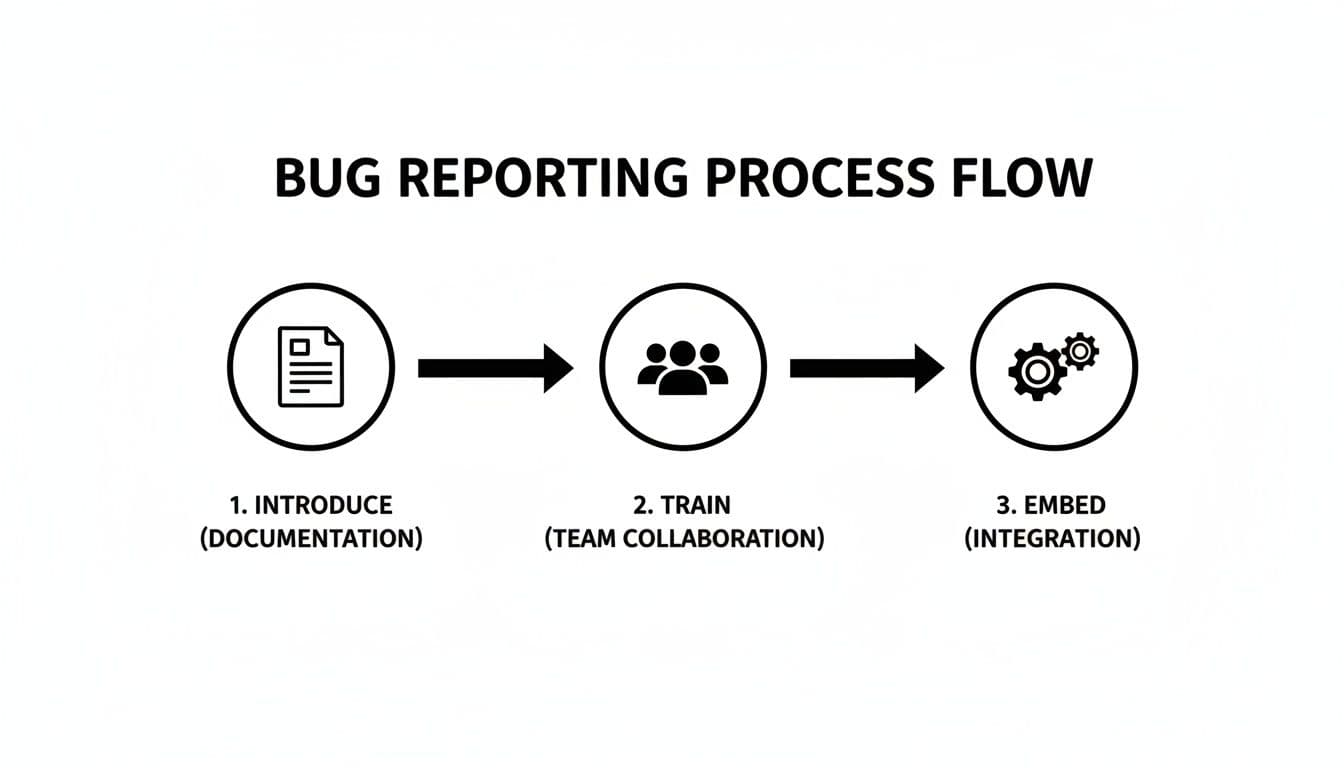
As you can see, it's not just about creating a template. Success comes from standardizing it, training the team on it, and embedding it into the tools you already use every day.
How Monito Turns Tedious Work Into A Single Click
Tools like the Monito Chrome extension completely change the game. Instead of asking someone to describe what happened, it lets them show it, with all the rich technical data developers need already attached.
Here’s a quick rundown of how it works:
- Automatic Data Capture: As you use your app, the extension is quietly recording everything—every click, scroll, and typed character.
- Technical Context Included: At the same time, it’s grabbing all the console logs, network requests, and environment details (OS, browser, screen size) that a developer would ask for.
- One-Click Reporting: The moment you spot a bug, you just click the extension's icon. It instantly packages the entire session—video replay, user actions, and all the tech logs—into one perfect report.
The real goal here is to make the easiest way to report a bug also the most detailed and effective way. Automation gets rid of the friction and the guesswork, so every single report is developer-ready the second it's submitted.
What used to be a 15-minute manual task becomes a 15-second click.
From there, the report can be pushed directly into your team's issue tracker, whether that's Jira, Linear, or something else. It automatically creates a new ticket and fills it with a flawless, developer-ready bug report. This is where the principles of a great bug report template meet the power of automation, saving your team countless hours and dramatically speeding up the entire debugging cycle.
Common Questions We Hear About Bug Reporting
Even with a killer bug report template, you're bound to run into some questions as your team starts using it. It's totally normal. Getting ahead of these common sticking points is the key to keeping your reporting workflow from getting bogged down.
Here are some of the questions we see pop up all the time, along with some straight-up answers.
What Is The Most Important Part Of A Bug Report?
If I had to pick just one thing, it's the Steps to Reproduce. No question. Every other field adds valuable context, but without a clear path to make the bug happen again, a developer is just guessing. A solid report walks them through every single click, every input, so they can see the bug with their own eyes.
This one element can be the difference between a bug getting fixed in an hour and one that gets kicked back with the dreaded "Cannot Reproduce" tag.
Pro Tip: If you only have time to perfect one part of your bug report, make it the reproduction steps. Think of it as the treasure map that leads right to the problem.
This is exactly why tools that capture user sessions, like Monito, are such a game-changer. They completely eliminate the guesswork and human error from this step by providing a perfect, repeatable recording of what went wrong.
How Should We Handle Reports From Non-Technical Users?
Ah, the classic "the login page is broken" report. This is where having a good process is everything. The best way to handle this is to have someone on the customer support or product team act as a first filter. Their job is to take that user's complaint and translate it into a structured bug report using your team's template.
This person can ask the right follow-up questions to fill in the missing details. Even better, they can use a tool like Monito to get a recording of the user's session. This transforms a vague complaint into a developer-ready ticket loaded with all the technical context they need to get started.
Does Every Single Bug Need A Full Report?
For tracking and consistency? Pretty much, yes. Even a tiny visual glitch benefits from a proper report. It ensures the issue is actually logged, prioritized correctly, and doesn't just fall through the cracks.
It honestly doesn't take much extra time to fill out the template for a small bug, but it keeps your entire process clean. The only exception might be if a developer spots a tiny styling issue and fixes it on the spot in five minutes. If it doesn't need to be tracked or tested by QA, then maybe a formal report is overkill. But if anyone else needs to know about it, a report is always the right move.
How Do I Integrate This Template Into Jira Or Linear?
Most modern issue trackers like Jira or Linear are built for this. If you have admin permissions, you can usually edit an issue type (like "Bug") and add custom fields for things like "Steps to Reproduce," "Expected Results," and "Actual Results."
You can also often set the main description box to pre-populate with your Markdown template. That way, every new bug ticket automatically starts with the right structure. Of course, tools like Monito have direct integrations that make this a non-issue—they map all the captured data to the right fields for you, making the whole thing seamless.
Stop burning hours on vague bug reports and start shipping fixes. Monito automates the whole process, capturing screen recordings, console logs, and network requests so your developers get perfect, actionable tickets every single time. Give your team the clarity they need to move fast. Try Monito for free today.
Article created using Outrank